Alliances and Teams
These are two different things, and it is worth knowing which one you want. An alliance is a standing group that lasts the whole campaign: the same players, listed together, scored together. A team is one side of one battle, and the next battle starts from nothing. Teams are the more common need, and you can use them without ever creating an alliance.
Both come with Supporter. Alliances check a subscription in three places: the Campaign Host needs one to create an alliance, a player needs their own before they can be put in it, and reading the standings by alliance needs your own as well. A campaign where only some players subscribe still works. Everyone else sits under Unaffiliated, which is an ordinary state rather than a problem to fix.
The player is checked, not only the host
A host on Supporter can create alliances and still find that a particular player cannot join one, because that player needs their own subscription. Their menu says so before you try: under Move to, every alliance is greyed out, with a line saying they need Supporter. Taking someone out of an alliance is never gated, and a subscription that lapses keeps the membership it already has.
What an alliance does
Nothing to the rules. An alliance pools no Requisition Points, shares no Supply Limit, and changes nothing about what anyone may field. What it gives you is a second way to read a campaign that has grown past a handful of players: standings by alliance instead of by player, a colour on the battle cards, and a one-tap way to put the right people on the right side when you schedule a battle.
The names are yours to choose. An alliance is not a faction grouping and nothing checks what army anyone brings, so one can hold two Space Marine players or an Ork and a Death Guard player who have agreed to burn the same city.
Turning alliances on
Alliances are off until the Campaign Host switches them on.
- On the campaign page, open Campaign Options and choose Edit Campaign.
- Under Custom Rules & Toggles, switch on Enable Alliances.
- Click Save Changes.
Changing a custom rule is itself a Supporter feature. A free host sees the switches with a note that the campaign runs the defaults.
Creating an alliance
Alliances live with the players who are in them, on the Players tab of the campaign's standings panel.
- Open the Players tab and find Active Participants.
- Click New alliance, the shield with a plus sign at the top right of the list. The bolt on its corner marks alliances as a Supporter feature.
- Give it a Name, and a Motto if you want one line of flavour under it.
- Pick a Colour. This is the colour the alliance carries everywhere else, so pick something you can tell apart at avatar size.
A Supporter campaign holds up to 4 alliances. Commander holds 8.
Putting players in an alliance
Drag a player onto an alliance to move them. On a touch screen, hold to pick someone up first. If you would rather not drag, open a player's menu, and under Move to pick the alliance you want or Unaffiliated to take them out.
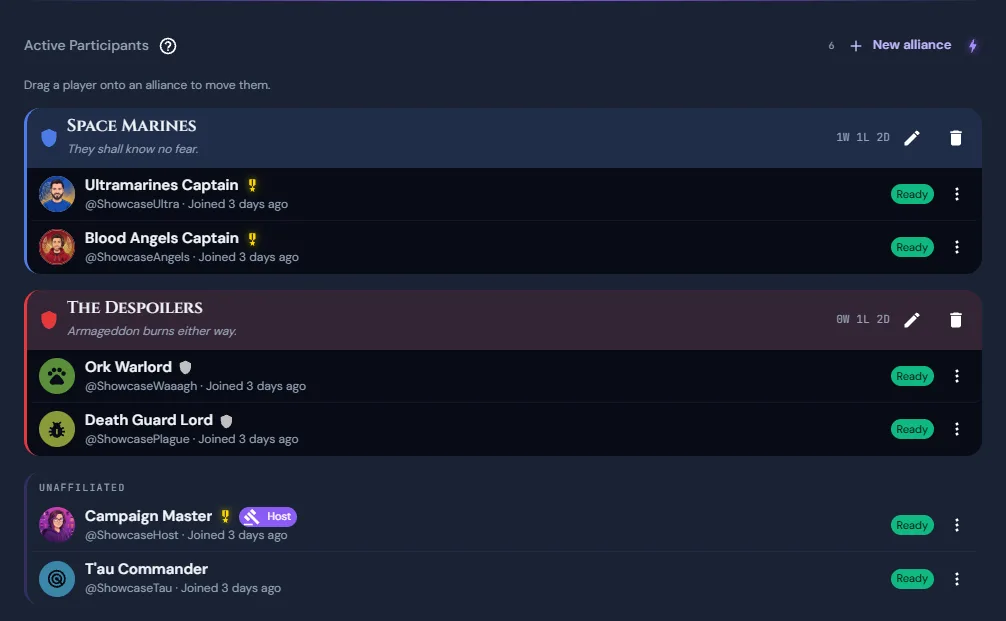
Players who are not in an alliance are listed under Unaffiliated at the bottom. In a mixed campaign that is where the free accounts sit. They still see who is in which alliance, and each alliance's record, here on the Players tab. What they cannot open is the standings by alliance, below.
Teams in a battle
A team is per battle, and it decides who wins together. Players on the same team share one result, and their victory points are added up to produce it. Leave a player's team blank and they fight for themselves.
If every player ends up on the same team, there is nobody on the other side to score against, so the victory points cannot decide it. The last player to vote to end the battle records how your side did: a win, a loss or a draw. The Campaign Host can record it too.
When the host creates or edits a battle with three or more players selected, each player gets a team picker. Teams can be changed until the battle starts. A battle can have up to four teams, which covers a 2v2, a 3v1, and a three-way with two allies in it.
If any of the players in the battle are in alliances, a Use alliances button appears. One tap puts each alliance on its own team and leaves everyone else fighting for themselves, which saves setting a 2v2 by hand every week.
A free host sees a note at three players saying that teams need Supporter, and everyone in the battle fights for themselves.
Two allies can still fight each other
Being in the same alliance does not force players onto the same team. Put them on different teams and the battle is a civil war, which counts for both of them exactly as it reads: one win and one loss, which cancel out for the alliance.
Where alliances show up
The shield
An alliance is marked by a shield in its own colour, and no other feature in Echelon is marked with one. It heads the alliance's group on the Players tab, sits beside each alliance under Move to, follows a player's name when the host picks who fights in a battle, and marks a side on the Stages page when everyone on it belongs to the same alliance.
On the standings
The panel that lists your players gains a second view. Two square buttons beside its tabs, shown while Standings is open, switch between them: the one with a person on it shows the player table, and the one with a shield ranks alliances instead, with the number of players in each, their battles, their combined W/L/D and their combined victory points.
This view goes by your own subscription, not the host's. On Free the two buttons are greyed out on every campaign, and hovering over or tapping them says why. The player table underneath is unaffected.

An alliance row is the sum of its members' rows and nothing else, so you can check it against the player standings by eye. Two allies who each played two games give the alliance four battles. One battle that two allies won together is worth a win to each of them.
On the battle cards
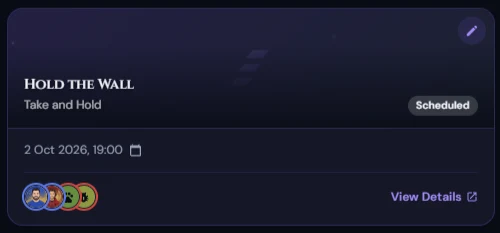
Every player avatar on a battle card is ringed in their alliance's colour. Players with no alliance get no ring, so a glance at a card tells you who is fighting alongside whom before you open it.
On a completed battle
The result groups players by the team they fought on, with the team's combined victory points and one verdict for the whole side, headed by the alliance's name when every player on that side shares one.
What this costs
| Free | Supporter | Commander | |
|---|---|---|---|
| Alliances per campaign | 0 | 4 | 8 |
| Join an alliance | ❌ | ✅ | ✅ |
| Standings by alliance | ❌ | ✅ | ✅ |
| Put players on teams | ❌ | ✅ | ✅ |
Joining an alliance and reading the standings by alliance are both checked against the player, not the host. A Supporter host running a campaign of free accounts can create alliances that nobody can be put into yet, and those players see the player standings only. Everything else in the campaign works as it always has.