Unit History
Every change to one of your Crusade Cards is written down as it happens: a rank gained, a Battle Honour, a Battle Scar, a relic, a battle fought, a new name. That record is kept on every plan, the free one included. Reading it back is part of Supporter and Commander, apart from a unit's earlier names, which every plan can read.
The record starts on the day unit history arrived in Echelon, and nothing before then can be rebuilt. A unit that already existed starts with one entry saying where it stood that day: its rank, its XP, its battles and its kills. A unit added later starts on the day it joined your Order of Battle.
A unit's History tab
Open the unit with Edit Details and go to History, the last tab on Edit Crusade Card.
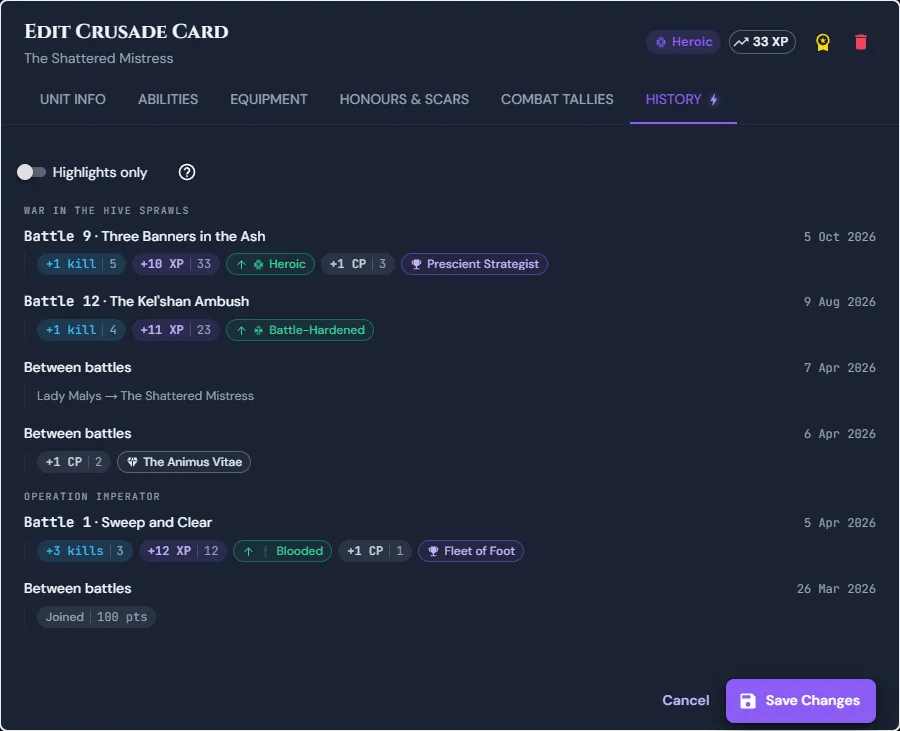
Each battle the unit fought is one row of pills under the battle's name, newest first, under the stage it belongs to. Changes made between battles, such as a relic or a new name, are grouped by day. The kills, XP and Crusade Points pills carry the unit's running total after the change, so +10 XP | 33 means it gained 10 XP and now has 33.
- Point at a pill to read the change in full, for example The Shattered Mistress rose to Heroic. On a phone, tap anywhere on a row to read every change in it.
- Turn on Highlights only to see just the turning points.
- Show older loads the next page.
The tab is only on your own units, and it stays readable after the campaign is completed or archived.
Reading the pills
A pill with a border is a turning point. A pill without one is a smaller change, usually a number that moved. The colours are the same whatever accent colour you have chosen, so the pills on this page look the way they do in your app.
| Pill | What it means |
|---|---|
+2 kills | Enemy units destroyed in that battle. A battle with no kills shows no pill |
+10 XP | XP gained. Red, with a minus, when XP was taken away |
+1 CP | Crusade Points gained, or lost when red |
| An up arrow and a rank, such as Heroic | The rank the unit rose to, with the rulebook's rank icon. A down arrow means it fell back a rank |
OOA R3 | Taken Out of Action, in round 3 when the battle was tracked round by round |
| Marked for Greatness | Picked out after the battle |
| A trophy and a name | A Battle Honour earned. Struck through when it was lost |
| A warning sign and a name | A Battle Scar taken. Struck through, in green, when the unit recovered from it |
| A diamond and a name | A Crusade Relic entrusted to the unit. Struck through when it was taken away |
| Legendary Veteran | The unit became a Legendary Veteran |
| Destroyed | The unit fell. The only solid red pill |
| Joined, with a points cost | The day the unit joined your Order of Battle |
| Record began, with a rank and tallies | Where a unit that already existed stood when unit history arrived |
| Old name → new name | A rename |
In your Battle Log
Your whole force's history is read in the Battle Log, on your roster's Chronicle tab, the one marked by a scroll and quill. It lists the battles your force has fought, newest first. Inside each battle, every unit that reached a turning point in it gets a row of pills, with its name in front.
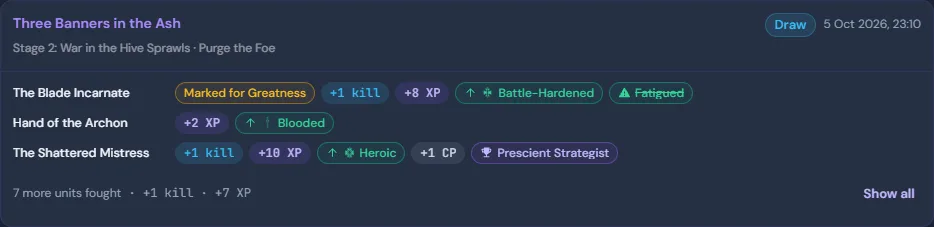
- Units that reached no turning point in the battle fold into one line that totals their kills and XP, for example 7 more units fought · +1 kill · +7 XP. Show all lists them too, with anything the line does not total, such as a unit taken Out of Action.
- The pills here show what changed, without running totals. A unit's totals are on its History tab.
- Between battles, only turning points are listed, such as a relic entrusted, grouped by day. An edit to a unit's XP, or a whole army joining from an import, stays on each unit's History tab.
- A unit you have removed keeps its rows here, under the name it had at the time. Its card is gone, and its History tab with it, so its smaller changes between battles are kept but no longer shown.
- Show older loads the next page of turning points. A battle older than those loaded so far appears once Show older has loaded back that far, so a battle never looks empty while its entries are still to load. Each battle that is showing reads its own entries, a hundred at a time: a battle with more than that shows Load the rest for the others.
After a battle
Once you have filed your post-battle report, the battle's page says how many highlights that report recorded for your units, with Read them to go to your Battle Log. A battle that recorded none says nothing.
On Combat Tallies
A unit's Combat Tallies tab lists two more things under its battle tallies, and both are free on every plan:
- Requisitions spent on this unit, from your Requisition Log.
- Also known as…: the names the unit went by before its current one, and the day each one changed. This is the one part of a unit's history every plan can read.
What counts as a highlight
A highlight is a turning point: a rank gained, a Battle Honour earned or lost, a Battle Scar taken or recovered, a relic entrusted, being Marked for Greatness, becoming a Legendary Veteran, or falling in battle. It is the pill with a border.
Everything else is a smaller change: XP and Crusade Points, the kills and Out of Action from each battle, joining and leaving the Order of Battle, falling back a rank, a relic taken away, a Legendary Veteran revoked, a rename, tallies corrected by hand, and where the record began. A unit's History tab lists them all, with Highlights only off. The Battle Log shows the ones from a battle inside that battle, and leaves out the ones made between battles. A change to a unit's points cost is recorded but not listed.
On the free plan
Your pages look the same as a Supporter's, without the history in them. Where it would be, there is one button:
- The Battle Log has Unlock history beside its heading. The log itself is free: it still lists every battle your force has fought, with its result and its photo if it has one, just without your units' pills in each one.
- A unit's History tab opens the upgrade window instead of the tab, and the card stays where it was.
- After a battle, the battle's page still says how many highlights your report recorded, with Unlock history beside it.
The window says how much is recorded for you, for example Your force has 214 entries in its unit history, the latest on 9 October 2026, and shows the History tab and the Battle Log as a Supporter sees them. See plans goes to the plans. If the window opened over a Crusade Card with changes you have not saved, it asks first, and Keep editing takes you back to save them. It opens only when you press one of those, never on its own.
Nothing is lost by waiting. Your units' history is recorded whichever plan you are on, so if you upgrade halfway through a campaign you read the whole record back to its first entry.
See an example
The Showcase campaign in the sidebar is a Crusade already under way. Open any force there and go to History to read every entry in its units' history, filtered by unit or narrowed to highlights. Under All units each row is named, as in the Battle Log. The T'au force is on the free plan, so it shows the count a free account sees instead of the entries.
Who can read it
Only you. Other players in your campaign cannot read your units' history, the Campaign Host included, and you cannot read theirs. The forces in the showcase campaign are the one exception: they exist to show what Echelon does, so their history is open to everyone on the tour.
What it is not
- The Record of Achievement, at the top of the Chronicle tab, is the story you write yourself. Unit history writes itself.
- The Campaign Chronicle, on the campaign's Overview, is the Campaign Host's narrative for the whole campaign.
- The Requisition Log, on the Requisitions tab, is where your Requisition Points went.